Agentic Scheduling | Skunk Works
Agentic Scheduling | Skunk Works
Designing an AI scheduler people can trust.
Designing an AI scheduler people can trust.
In six weeks, our product triad tested whether AI could help managers fill open shifts faster without removing human judgment from the process.
In six weeks, our product triad tested whether AI could help managers fill open shifts faster without removing human judgment from the process.

ROLE
Design Lead
TIMELINE
Six-week validation sprint; six months of continued dev.
Six-week validation sprint; six months of continued dev.
OUTCOME
First AI scheduling agent validated; $6.2M in 2026 bookings
First AI scheduling agent validated; $6.2M in 2026 bookings
AREAS
AI-assisted scheduling, customer research, workflow design
AI-assisted scheduling, customer research, workflow design
AI-assisted scheduling, customer research, workflow design
Project statistics:
48× faster
48× faster
48× faster
At filling open shifts. 120 minutes to 2.5 minutes for ~100 shifts
At filling open shifts. 120 minutes to 2.5 minutes for ~100 shifts
At filling open shifts. 120 minutes to 2.5 minutes for ~100 shifts
24/7
24/7
24/7
Agent availability
Agent availability
Agent availability
$6.2M
$6.2M
$6.2M
In 2026 bookings so far
In 2026 bookings so far
In 2026 bookings so far
Disclaimer
Before we dive in, I want to note that, in compliance with my non-disclosure agreement, I’ve omitted any confidential information from this case study. The insights shared here are my own and don’t necessarily represent the views of my company.
Before we dive in, I want to note that, in compliance with my non-disclosure agreement, I’ve omitted any confidential information from this case study. The insights shared here are my own and don’t necessarily represent the views of my company.
THE CHALLENGE
What does AI mean for scheduling?
What does AI mean for scheduling?
What does AI mean for scheduling?
How might an AI agent help managers fill open shifts without turning a high-stakes decision into a black box? Can we build an AI agent that plugs into our scheduling platform to help our users by filling their open shifts, making schedules, predicting scheduling trends, or automating some of the tedious manual work? What would that look like? Can we build it to be trustworthy, reliable, and transparent enough that our end user knows why these suggestions were made?
This proved to be a high stakes opportunity. If we can build an algorithm that will successfully pair the most eligible employee to an opening, then we have technically succeeded. But there's the human element, where a manager has additional information that a computer can not. Maybe "Bob" doesn't like working at a particular job site, or "Margaret" has a book club on Thursdays so she only gets those shifts if it's an emergency. Our algorithm will only work on what data it has available, and whether or not our users will trust it, is the question.
How might an AI agent help managers fill open shifts without turning a high-stakes decision into a black box? Can we build an AI agent that plugs into our scheduling platform to help our users by filling their open shifts, making schedules, predicting scheduling trends, or automating some of the tedious manual work? What would that look like? Can we build it to be trustworthy, reliable, and transparent enough that our end user knows why these suggestions were made?
This proved to be a high stakes opportunity. If we can build an algorithm that will successfully pair the most eligible employee to an opening, then we have technically succeeded. But there's the human element, where a manager has additional information that a computer can not. Maybe "Bob" doesn't like working at a particular job site, or "Margaret" has a book club on Thursdays so she only gets those shifts if it's an emergency. Our algorithm will only work on what data it has available, and whether or not our users will trust it, is the question.
Target worker levels
Target worker levels
Target worker levels
Optimal Schedule
Optimal Schedule
Optimal Schedule
Employee data
Employee data
Availability
Availability
Skill matching
Skill matching
Annual Leave
Annual Leave
Work Regulations
Work Regulations
Fairness
Fairness
Overtime Avoidance
Overtime Avoidance
Productivity
Productivity
MY ROLE AND THE TEAM
Creating a Product Triad
Creating a Product Triad
Creating a Product Triad
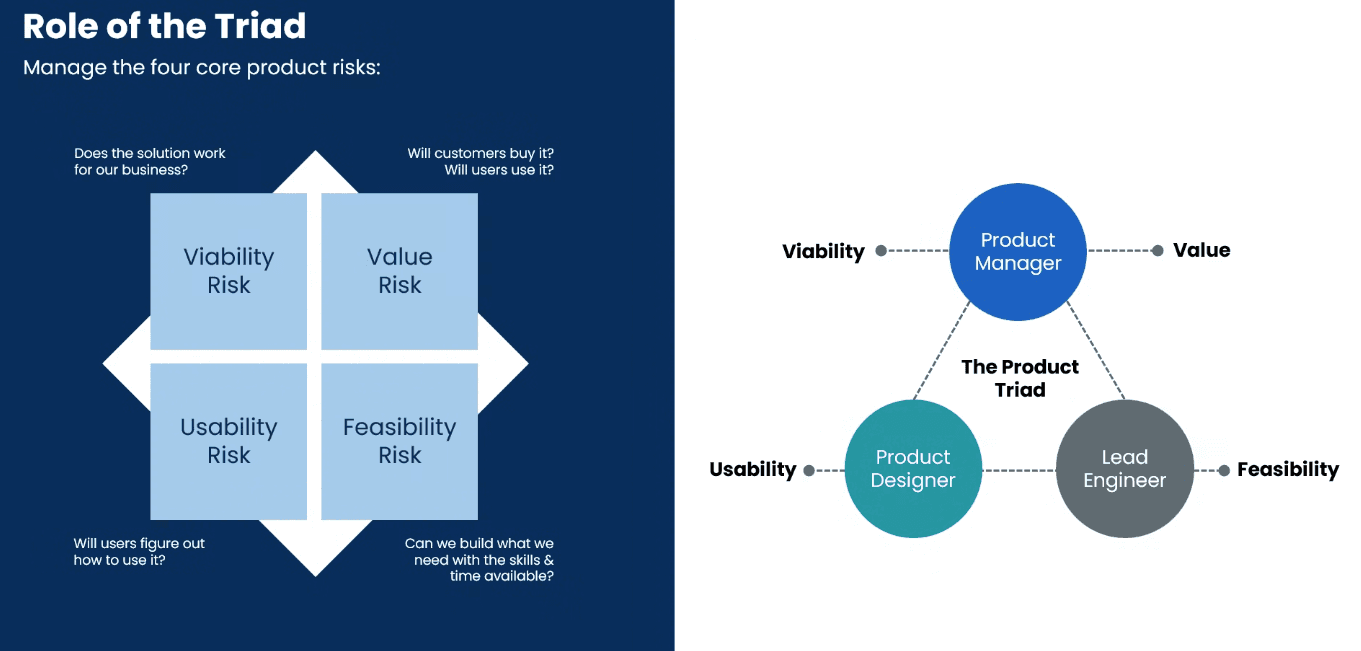
I piloted the creation of Product Triads for WW and it was so successful, we've changed the way we structure teams across the entire organization. This skunkworks project took place just as my previous triad came to an end, so I was a bit of a mentor to the other skunkworks teams that were being created at the same time. For this project, I was again the Design Lead exploring whether an AI scheduler could integrate across our four product verticals. The team included a Product Manager, Product Designer, and Product Engineer supported by a handful of developers. We began with a six-week validation sprint to gather evidence, build an MVP, and decide whether the opportunity was worth pursuing. The project continued into a longer product development cycle.
I piloted the creation of Product Triads for WW and it was so successful, we've changed the way we structure teams across the entire organization. This skunkworks project took place just as my previous triad came to an end, so I was a bit of a mentor to the other skunkworks teams that were being created at the same time. For this project, I was again the Design Lead exploring whether an AI scheduler could integrate across our four product verticals. The team included a Product Manager, Product Designer, and Product Engineer supported by a handful of developers. We began with a six-week validation sprint to gather evidence, build an MVP, and decide whether the opportunity was worth pursuing. The project continued into a longer product development cycle.
DESIGN PRINCIPLES
Three areas we're targeting. Speed, human control, explainability.
Three areas we're targeting. Speed, human control, explainability.
After talking with users, doing research, and laying out everything we know, there were several principles that kept showing up as of utmost importance. First and foremost, speed of filling open posts. Our schedulers on average, spend 90-180 minutes a day filling in open shifts. Busy days require more time, slower days allow our schedulers to look ahead and plan out the upcoming weeks schedule, regardless of the day, having a solution that can fill open shifts faster than manually scheduling is a top priority. Secondly, keeping a human at the steering wheel is also incredibly important. There is a lot of knowledge that our schedulers have that is difficult to put into an agentic AI scheduling tool, and actually assigning a worker to a shift is not something you want to do willy-nilly. These shifts are being worked by real people, who have contracts, labor rules, and operational risk that needs to be accounted for. A human needs to be able to confirm all the decisions made by the AI, it can take the rest of the repetitive tasks, but we don't aim to replace people, just automate their work to give them more time back in their day to focus on other things that matter. Lastly, we needed the Agent to be trustworthy, if you don't trust the AI, then why would you ever use it to balance your schedule? Our AI Agent will run on an algorithm that rakes all the data from all the workers, and display the top candidates who meet the requirements. We want to make sure the reasoning is transparent, so the human-in-the-loop knows why they are deemed the top choice.
After talking with users, doing research, and laying out everything we know, there were several principles that kept showing up as of utmost importance. First and foremost, speed of filling open posts. Our schedulers on average, spend 90-180 minutes a day filling in open shifts. Busy days require more time, slower days allow our schedulers to look ahead and plan out the upcoming weeks schedule, regardless of the day, having a solution that can fill open shifts faster than manually scheduling is a top priority. Secondly, keeping a human at the steering wheel is also incredibly important. There is a lot of knowledge that our schedulers have that is difficult to put into an agentic AI scheduling tool, and actually assigning a worker to a shift is not something you want to do willy-nilly. These shifts are being worked by real people, who have contracts, labor rules, and operational risk that needs to be accounted for. A human needs to be able to confirm all the decisions made by the AI, it can take the rest of the repetitive tasks, but we don't aim to replace people, just automate their work to give them more time back in their day to focus on other things that matter. Lastly, we needed the Agent to be trustworthy, if you don't trust the AI, then why would you ever use it to balance your schedule? Our AI Agent will run on an algorithm that rakes all the data from all the workers, and display the top candidates who meet the requirements. We want to make sure the reasoning is transparent, so the human-in-the-loop knows why they are deemed the top choice.
Hours to Minutes
Filling open posts isn’t as quick and easy as customers would like, meaning they’re spending more time on their schedule, filling open posts.
Filling open posts isn’t as quick and easy as customers would like, meaning they’re spending more time on their schedule, filling open posts.
Human-in-the-Loop
Our AI Agent will propose scheduling decisions, but nothing should be finalized without a human verifying the results
Our AI Agent will propose scheduling decisions, but nothing should be finalized without a human verifying the results
AI Reasoning
Being transparent on why our agent suggests workers is critical to building trust. If you can't trust our agent, why would you use it to manage your schedules?
Being transparent on why our agent suggests workers is critical to building trust. If you can't trust our agent, why would you use it to manage your schedules?
DECISION 1: EXPLAINABLE RECOMMENDATIONS & FAILURE STATES
I chose cards instead of a data grid to make open shifts easier to scan. Their layout mirrors the schedule board schedulers use every day, including future assigned shifts. This also gives our many data-grid pages a visual break. Before Agentic AI runs, the cards appear unfilled; afterward, they show the completed state and reasoning without adding clutter. (We later revised this; see the current design.) There are three main constraints that we have discovered:
1. Availability - If a worker is on PTO, or already working, they are not a suitable match
2. Certification - The suggested worker needs to be legally allowed to work a shift, they must meet eligibility
3. Avoids overtime - This last constraint is not a hard constraint as the first two. Avoiding overtime is a main desire for our schedulers, however, sometimes a worker in overtime is still the cheapest option.
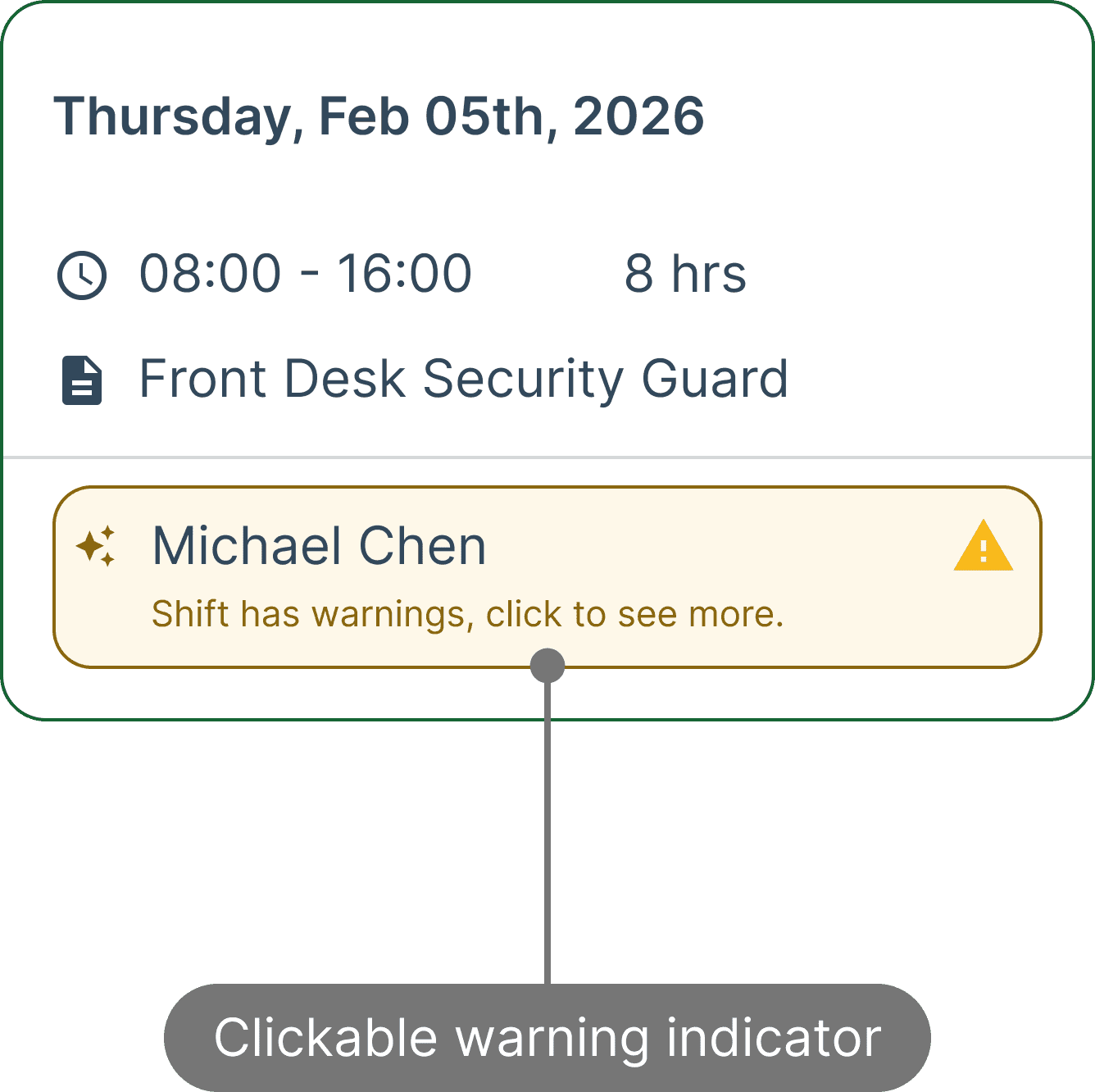
When it comes to failure states, our legacy product shows warnings in a table, for things like expired certifications, conflicting hours, possible overtime. We brought this idea over, but put it into the card after the agent ran. The warning label appears the same for every warning, but clicking the card pops up a tooltip showing the reasoning.
I chose cards instead of a data grid to make open shifts easier to scan. Their layout mirrors the schedule board schedulers use every day, including future assigned shifts. This also gives our many data-grid pages a visual break. Before Agentic AI runs, the cards appear unfilled; afterward, they show the completed state and reasoning without adding clutter. (We later revised this; see the current design.) There are three main constraints that we have discovered:
1. Availability - If a worker is on PTO, or already working, they are not a suitable match
2. Certification - The suggested worker needs to be legally allowed to work a shift, they must meet eligibility
3. Avoids overtime - This last constraint is not a hard constraint as the first two. Avoiding overtime is a main desire for our schedulers, however, sometimes a worker in overtime is still the cheapest option.
When it comes to failure states, our legacy product shows warnings in a table, for things like expired certifications, conflicting hours, possible overtime. We brought this idea over, but put it into the card after the agent ran. The warning label appears the same for every warning, but clicking the card pops up a tooltip showing the reasoning.


DECISION 2: DISRUPTED SHIFTS
This decision came after realizing we were dealing with two distinct buckets of user wants from our AI Agent. One bucket wants what I've already shown, an AI agent that can fill schedules and suggest the most suitable employee for an unassigned shift. The other bucket wants to use an AI agent to quickly fill shifts that have already started, and an employee called out sick, or never showed up unexplained. They currently have a select group of security guards who are nomads, and are on call to be told to drive to a job site to fill a shift that has a no-call/no-show. If this group of security guards aren't available, or don't exist, a manager will go to the site that's missing a guard and work it until a suitable replacement can be found. This is both costly financially, but takes a lot of human intervention to call, message, and ultimately find a replacement for this last minute urgent shift. This brought us to having a second tab under our Agentic Scheduling, which is called "Disrupted Shifts." It's a slightly different algorithm, but pulls in a list of suitable employees, and allows the user to send out offers via SMS, in-app notifications, email, or phone calls.
This decision came after realizing we were dealing with two distinct buckets of user wants from our AI Agent. One bucket wants what I've already shown, an AI agent that can fill schedules and suggest the most suitable employee for an unassigned shift. The other bucket wants to use an AI agent to quickly fill shifts that have already started, and an employee called out sick, or never showed up unexplained. They currently have a select group of security guards who are nomads, and are on call to be told to drive to a job site to fill a shift that has a no-call/no-show. If this group of security guards aren't available, or don't exist, a manager will go to the site that's missing a guard and work it until a suitable replacement can be found. This is both costly financially, but takes a lot of human intervention to call, message, and ultimately find a replacement for this last minute urgent shift. This brought us to having a second tab under our Agentic Scheduling, which is called "Disrupted Shifts." It's a slightly different algorithm, but pulls in a list of suitable employees, and allows the user to send out offers via SMS, in-app notifications, email, or phone calls.


RESEARCH EVIDENCE
What we learned, and what changed because of it
What we learned, and what changed because of it
We had a few strokes of luck with our six week skunkworks project. Firstly, I was speaking at a user conference, and running workshops to uncover pain points for our users when it comes to WT scheduling. So, naturally I carved out a block to talk about bringing AI Agents into WT, a topic that was very sought-after at the time that AI agents were being introduced everywhere in the world, so our users were quite eager to talk about it in their businesses software.
We had a few strokes of luck with our six week skunkworks project. Firstly, I was speaking at a user conference, and running workshops to uncover pain points for our users when it comes to WT scheduling. So, naturally I carved out a block to talk about bringing AI Agents into WT, a topic that was very sought-after at the time that AI agents were being introduced everywhere in the world, so our users were quite eager to talk about it in their businesses software.
Participants
User conference
User conference
The user conference allowed me to collect data on what was important to our users. We ran a 'Jobs to be done' exercise with pain points to uncover the main issues our users have with scheduling today. The pain points were then ranked and discussed how an 'automated agent' could help remove those pain points.
The user conference allowed me to collect data on what was important to our users. We ran a 'Jobs to be done' exercise with pain points to uncover the main issues our users have with scheduling today. The pain points were then ranked and discussed how an 'automated agent' could help remove those pain points.


Running workshops at our user conference in Texas this year with our customers.
On-site visits
On-site visits
I was also fortunate to attend a two day on-site visit of one of our largest users and physically sit in on their day-to-day operation. The point of our visit was to build a relationship with the schedulers at this company, who will ultimately become co-creators/early adopters of our AI agent and help us create a product that actually delivers. We spent one day in a meeting room running through early concepts, hearing their feedback, and workshopping which pain points to target. The second day, we sat in on how their security operators use our product today, and how our AI agent could take the repetitive, time consuming scheduling work and automate it.
I was also fortunate to attend a two day on-site visit of one of our largest users and physically sit in on their day-to-day operation. The point of our visit was to build a relationship with the schedulers at this company, who will ultimately become co-creators/early adopters of our AI agent and help us create a product that actually delivers. We spent one day in a meeting room running through early concepts, hearing their feedback, and workshopping which pain points to target. The second day, we sat in on how their security operators use our product today, and how our AI agent could take the repetitive, time consuming scheduling work and automate it.


On-site visits with one of our users. (images edited to not disclose any private information)
Prototypes tested
Prototypes tested
I created several prototypes to test with our users. These prototypes were created with the assistance of a Gemini gem to scrape all the data from user interviews, documentation, and notes from the on-site visits and workshops to synthesize our findings into key components to include. Figma Make helped rapidly create prototypes using our design system so the output functions and looks like one of our products. I took the outputs and manually tweaked them to meet specific needs that I know needed to be included that AI missed, or strangely had wonky output. If you'd like to test the prototypes yourself, you can find them through these links:
Prototype 1: Click here
Prototype 2: Click here
I created several prototypes to test with our users. These prototypes were created with the assistance of a Gemini gem to scrape all the data from user interviews, documentation, and notes from the on-site visits and workshops to synthesize our findings into key components to include. Figma Make helped rapidly create prototypes using our design system so the output functions and looks like one of our products. I took the outputs and manually tweaked them to meet specific needs that I know needed to be included that AI missed, or strangely had wonky output. If you'd like to test the prototypes yourself, you can find them through these links:
Prototype 1: Click here
Prototype 2: Click here

What changed because of our research?
What changed because of our research?
The feedback did not simply confirm our assumptions, it changed the shape of the MVP. Many of our original ideas remained on the table, however there were a few assumptions that we got wrong, or at least, under emphasized the value of. The main two are the ability to fine tune the algorithm on the fly, and the ability to switch between offering a shift or assigning it to a suggested worker.
We added the ability to tweak the settings to give results based on soft constraints and included more than only 3 criteria to find the best fit:
The feedback did not simply confirm our assumptions, it changed the shape of the MVP. Many of our original ideas remained on the table, however there were a few assumptions that we got wrong, or at least, under emphasized the value of. The main two are the ability to fine tune the algorithm on the fly, and the ability to switch between offering a shift or assigning it to a suggested worker.
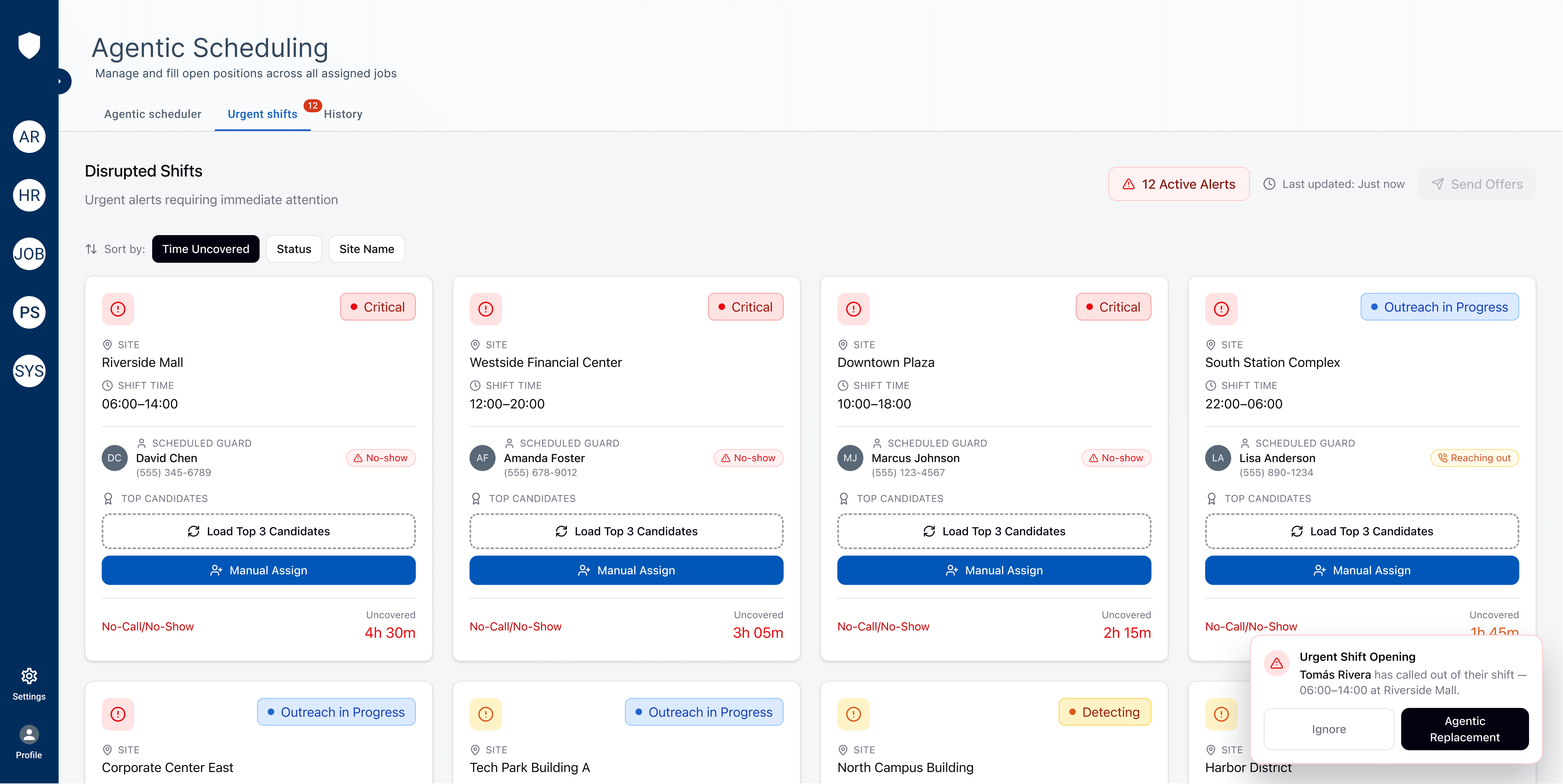
We added the ability to tweak the settings to give results based on soft constraints and included more than only 3 criteria to find the best fit:
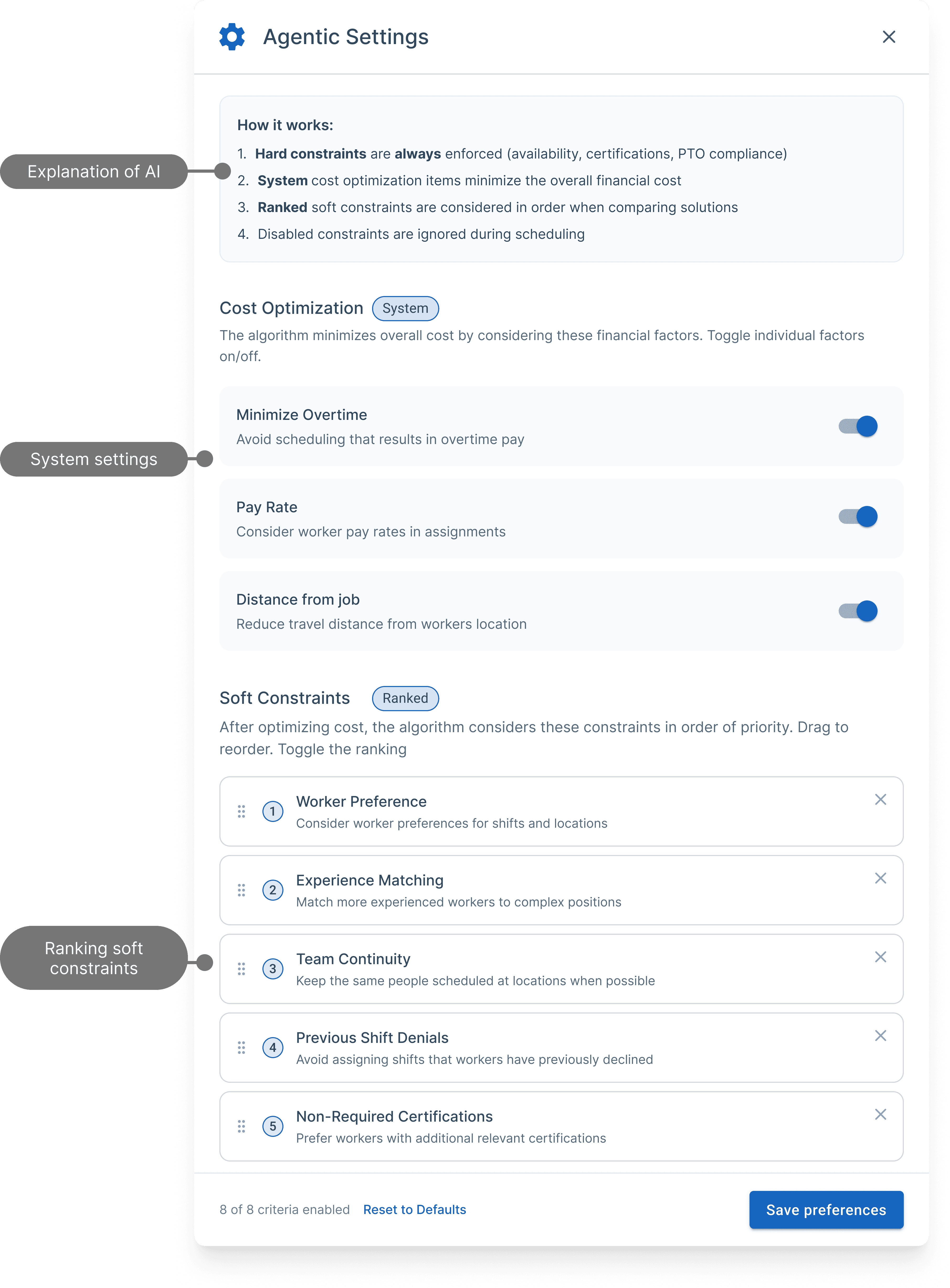
We added the ability to assign or offer the shift, as opposed to just assigning. Many of our users stressed the importance of sending these shifts to 10+ workers as a job offer, and first-come-first-serve who accepts it:
We added the ability to assign or offer the shift, as opposed to just assigning. Many of our users stressed the importance of sending these shifts to 10+ workers as a job offer, and first-come-first-serve who accepts it:

Lastly this was more of a confirmation of our edge-cases and trade-offs we were already expecting:
Lastly this was more of a confirmation of our edge-cases and trade-offs we were already expecting:
01 / TRADE-OFFS
Key Trade-offs
Automation vs. User Control: Full auto-generation saves time, but planners reject schedules if the system feels like a “black box”. We always want to keep the human in the loop, we need a human to always have the final decision. The MVP must prioritize explainability (showing why a worker was selected) over fully autonomous scheduling
Hard Constraints vs. Soft Preferences: Enforcing rigid rules (certifications, fair workweek laws, rest periods) vs. optimizing soft goals (worker preference, proximity). For an MVP, hard compliance must be non-negotiable, while soft preferences should use simple toggles rather than complex multi-variable sliders.
Real-Time Optimization vs. UI Latency: Re-running AI optimization on every manual shift selected creates UI lag. Manual overrides should remain client-side, triggering batch recalculations only on explicit action or final publish.
02 / FAILURE MODES
Critical Edge Cases
Zero-Match Fallbacks: When no worker meets 100% of hard constraints (e.g., zero certified staff in proximity), the AI must present “least-violating” options with clear waiver warnings rather than a dead-end error state.
Mid-Schedule Cascades: When a worker calls out mid-week, re-running the AI engine to fill that single gap must locally patch the slot without reordering or disrupting the rest of the week’s published schedule.
Multi-User Race Conditions: If two shift managers edit the draft schedule while WAIve is generating assignments in the background, the UI needs clear draft-locking indicators or soft-conflict merge states. Having one user show up as a top 3 choice for multiple shifts is great, until you chose them for all those shifts and now they’re in overtime and no longer a top choice. It’s a little bit like the butterfly effect where choosing 1 worker for a shift could result in all the other results being different.
CURRENT SOLUTION
Where we are six months later
Where we are six months later
After the six weeks of the skunkworks sprint, our product was passed on to be a dedicated project to put full resources on. This means it has changed quite a bit since the skunkworks was completed. A new design system has updated the look of the cards, the navigation, most of the components. We've built more into our algorithm, opened some doors to speed up our process, been coached by AI companies on building an Agentic AI Agent, and are actively still talking with early adopters to continue to shape our product.
After the six weeks of the skunkworks sprint, our product was passed on to be a dedicated project to put full resources on. This means it has changed quite a bit since the skunkworks was completed. A new design system has updated the look of the cards, the navigation, most of the components. We've built more into our algorithm, opened some doors to speed up our process, been coached by AI companies on building an Agentic AI Agent, and are actively still talking with early adopters to continue to shape our product.

OUTCOMES
Proved value
Proved value
After the six weeks of the skunkworks sprint, our product was passed on to be a dedicated project to put full resources on. This means it has changed quite a bit since the skunkworks was completed. A new design system has updated the look of the cards, the navigation, most of the components. We've built more into our algorithm, opened some doors to speed up our process, been coached by AI companies on building an Agentic AI Agent, and are actively still talking with early adopters to continue to shape our product.
After the six weeks of the skunkworks sprint, our product was passed on to be a dedicated project to put full resources on. This means it has changed quite a bit since the skunkworks was completed. A new design system has updated the look of the cards, the navigation, most of the components. We've built more into our algorithm, opened some doors to speed up our process, been coached by AI companies on building an Agentic AI Agent, and are actively still talking with early adopters to continue to shape our product.
Business & product outcomes
Business & product outcomes
Aside from having excitement building from our companies first AI integration, we have seen great results building as the project grows. Our user feedback has been very positive, and we continue to work with early adopters to have a big impact on our customers scheduling with our Agentic Scheduling agent.
Aside from having excitement building from our companies first AI integration, we have seen great results building as the project grows. Our user feedback has been very positive, and we continue to work with early adopters to have a big impact on our customers scheduling with our Agentic Scheduling agent.
$3.3M
$3.3M
Spent on product innovation in 2026
Spent on product innovation in 2026
Spent on product innovation in 2026
$13.1M
$13.1M
$13.1M
in ARR Bookings, 101% of budget
in ARR Bookings, 101% of budget
in ARR Bookings, 101% of budget
48× faster
48× faster
than a human at filling 100+ open shifts
than a human at filling 100+ open shifts
than a human at filling 100+ open shifts
6.7/10 to 9.2/10
6.7/10 to 9.2/10
Increase in likelyhood of adopting an agentic scheduler after seeing our prototype
Increase in likelyhood of adopting an agentic scheduler after seeing our prototype
Increase in likelyhood of adopting an agentic scheduler after seeing our prototype
"When can I have it"
"When can I have it"
#1 response after seeing our demos
#1 response after seeing our demos
#1 response after seeing our demos
5
5
5
New triads creating AI agents since our skunkworks success
New triads creating AI agents since our skunkworks success
LEARNINGS
Agentic scheduling is not about removing people from the decision. It is about giving them a faster, more intelligible way to make the right call when time, rules, and human judgment are all in motion.
Agentic scheduling is not about removing people from the decision. It is about giving them a faster, more intelligible way to make the right call when time, rules, and human judgment are all in motion.
Earn trust before optimizing for speed.
Earn trust before optimizing for speed.
Earn trust before optimizing for speed.
The first question users asked was not “How quickly can it schedule?” but “Will it make a decision I can stand behind?” Designing clear review moments, safe defaults, and easy overrides made the automation feel like a capable teammate, not an opaque replacement.
The first question users asked was not “How quickly can it schedule?” but “Will it make a decision I can stand behind?” Designing clear review moments, safe defaults, and easy overrides made the automation feel like a capable teammate, not an opaque replacement.
The first question users asked was not “How quickly can it schedule?” but “Will it make a decision I can stand behind?” Designing clear review moments, safe defaults, and easy overrides made the automation feel like a capable teammate, not an opaque replacement.
Make the rationale visible, not just the recommendation.
Make the rationale visible, not just the recommendation.
Make the rationale visible, not just the recommendation.
A match is only useful when its reasoning can be understood at a glance. Surfacing the constraints, trade-offs, and confidence behind each suggestion turned a complex decision into something managers could assess, explain, and improve.
A match is only useful when its reasoning can be understood at a glance. Surfacing the constraints, trade-offs, and confidence behind each suggestion turned a complex decision into something managers could assess, explain, and improve.
A match is only useful when its reasoning can be understood at a glance. Surfacing the constraints, trade-offs, and confidence behind each suggestion turned a complex decision into something managers could assess, explain, and improve.
Keep the system learning with people, not instead of them.
Keep the system learning with people, not instead of them.
Keep the system learning with people, not instead of them.
The most valuable signal was not whether the agent was technically correct. It was where an experienced scheduler paused, adjusted, or disagreed. Those moments are the design work: they reveal how the product should evolve while preserving human judgment and accountability.
The most valuable signal was not whether the agent was technically correct. It was where an experienced scheduler paused, adjusted, or disagreed. Those moments are the design work: they reveal how the product should evolve while preserving human judgment and accountability.
The most valuable signal was not whether the agent was technically correct. It was where an experienced scheduler paused, adjusted, or disagreed. Those moments are the design work: they reveal how the product should evolve while preserving human judgment and accountability.