How I use AI
2026's Biggest Buzz-Word.
Is Design on it's way out? Not at all, but it has changed.

What’s really happening with AI and design
If you scroll LinkedIn or Twitter long enough, you’ll probably run into the same two opinions over and over: “AI is going to replace designers” or “AI is just another tool, everybody calm down.” Neither one is all that useful when you’re actually trying to figure out what skills to build, what’s worth paying attention to, or how to even talk about AI with your team or clients.
The way I have used AI (in 2026), is a lot less dramatic, and a lot more practical. AI is speeding up the ability to create designs, changing how I work, and highlighting the human-judgement aspects of design. But it is not, and never will, change whether designers matter.
Most of our teams aren’t operating in some fully AI-powered future, and they’re definitely not ignoring it either. With my current design team, it's somewhere in the middle: people stitching together ChatGPT, Gemini, or Claude with Figma, Bolt, Replit, whatever helps them move faster. Some of our designers are all-in and experimenting constantly, others are skeptical, and leadership is often talking about “AI initiatives” without fully defining what success even looks like. There's a pressure to stay informed and on the bleeding edge of AI in design, but it's a lot of pressure and uncertainty, which is a big part of why AI feels so overwhelming right now. The doom and gloom of AI taking our jobs is often remedied when it's reminded that AI isn't a human, and humans often don't know what humans want. It can take a lot of iterating, time, and knowledge before we can decide what we truly want and what is the best. This is something that AI can't fill in for us. It's a great reminder that humans will always need to have the final say for what is best for humans.
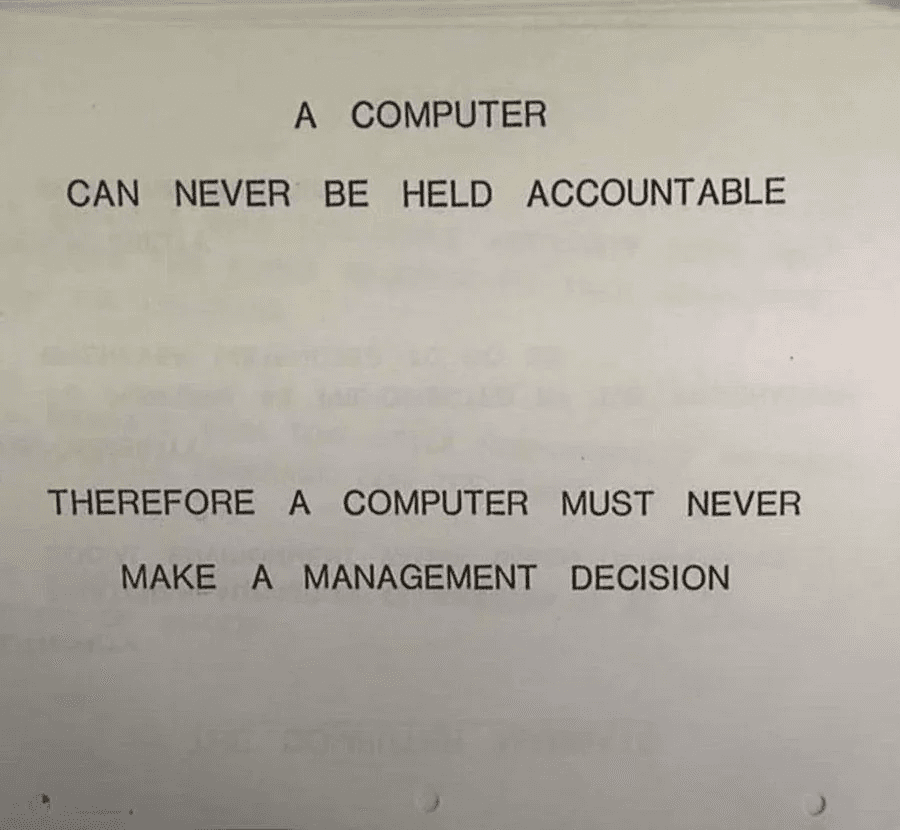
From an IBM training Manual 1979. Sentiment is true in 2026
From an IBM training Manual 1979. Sentiment is true in 2026
From an IBM training Manual 1979. Sentiment is true in 2026
The AI Moat:
As AI rapidly commoditizes inface production, the durable advantage shifts from what we design to who we design for and why.
As AI rapidly commoditizes inface production, the durable advantage shifts from what we design to who we design for and why.
As AI rapidly commoditizes inface production, the durable advantage shifts from what we design to who we design for and why.
Humans still own judgement
Humans still own judgement
Humans still own judgement
Before I dive into the main stages of design, I have outlined some of the major tools I use, or have used, and what stages of the design cycle they are most beneficial. This list will inevitably change, as this list has changed in the last 3 months, but here's a snapshot of some of the major AI tools that I'm using today (as of spring 2026).
Before I dive into the main stages of design, I have outlined some of the major tools I use, or have used, and what stages of the design cycle they are most beneficial. This list will inevitably change, as this list has changed in the last 3 months, but here’s a snapshot of some of the major AI tools that I’m using today (as of spring 2026).
Before I dive into the main stages of design, I have outlined some of the major tools I use, or have used, and what stages of the design cycle they are most beneficial. This list will inevitably change, as this list has changed in the last 3 months, but here’s a snapshot of some of the major AI tools that I’m using today (as of spring 2026).
DISCOVER
DISCOVER






DEFINE
DEFINE


DEVELOP
DEVELOP

DELIVER
DELIVER
My AI-Assisted Product Design WorkFlow
Discovery
My AI-Assisted Product Design WorkFlow
Discovery
Goal
Understand users, uncover pain points, identify opportunities, align on the problem space.
Understand users, uncover pain points, identify opportunities, align on the problem space.
Understand users, uncover pain points, identify opportunities, align on the problem space.
How I Use AI
Summarizing interview transcripts and workshop notes
Identifying recurring themes across research sessions
Generating hypotheses and follow-up research questions
Turning raw observations into structured insights
Drafting journey maps, JTBD frameworks, and opportunity areas
Assist in drafting Maze surveys, and also analyzing the information obtained from surveys
Summarizing interview transcripts and workshop notes
Identifying recurring themes across research sessions
Generating hypotheses and follow-up research questions
Turning raw observations into structured insights
Drafting journey maps, JTBD frameworks, and opportunity areas
Assist in drafting Maze surveys, and also analyzing the information obtained from surveys
Summarizing interview transcripts and workshop notes
Identifying recurring themes across research sessions
Generating hypotheses and follow-up research questions
Turning raw observations into structured insights
Drafting journey maps, JTBD frameworks, and opportunity areas
Assist in drafting Maze surveys, and also analyzing the information obtained from surveys
Tools
Gemini, Claude, Firefly, Loom, Pendo, Maze, Notebook LM
Gemini, Claude, Firefly, Loom, Pendo, Maze, Notebook LM
Gemini, Claude, Firefly, Loom, Pendo, Maze, Notebook LM
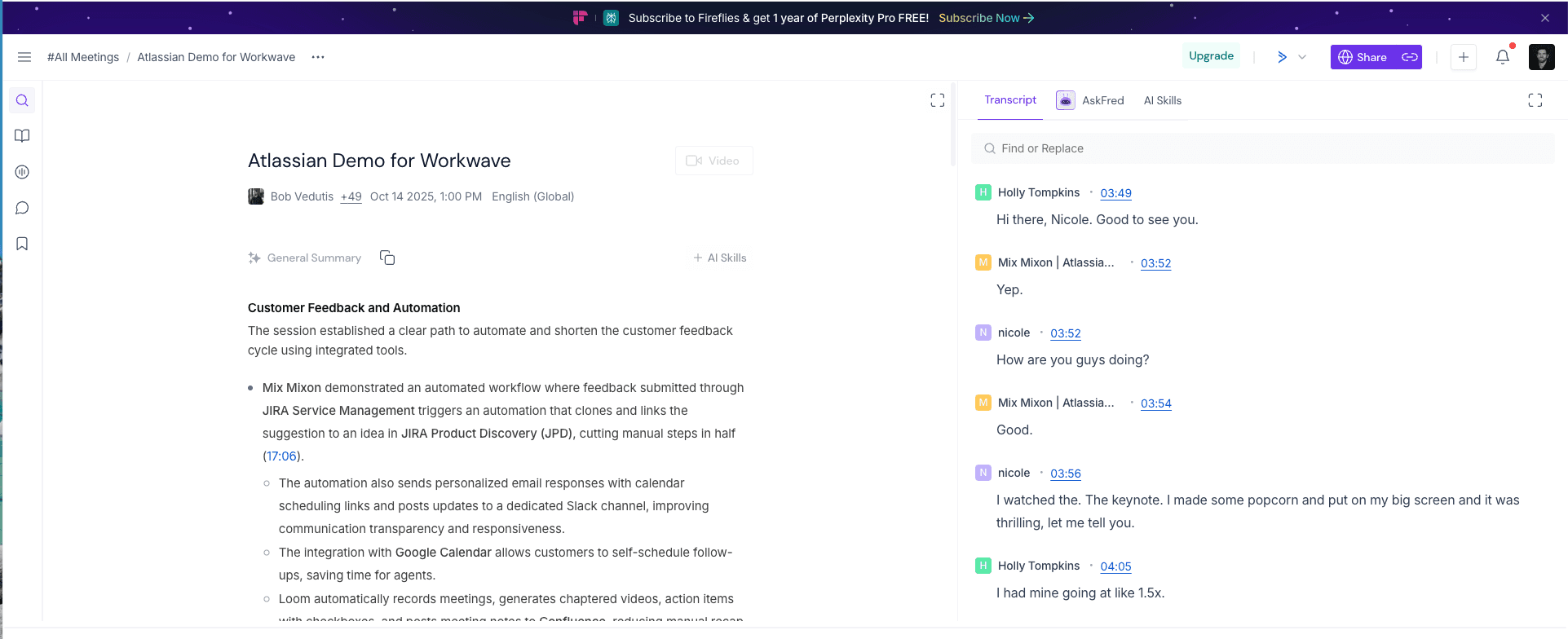
Here's how my latest project used AI to help run discovery. We had a ton of user interviews, transcripts, video calls, documentation, and wanted to pull information out of it. This would normally take countless hours to read through them all, take notes, and manually start synthesizing the data. Loom records video calls and transcribes the meeting, Fireflies does the same but has different breakdowns, Gemini digests our documentation, Maze collects user survey data, and finally Notebook LM takes all the data from these other 4 processes, and acts as a powerhouse for synthesizing the data in themes, pain points, patterns, possible avenues to follow to solve the biggest problems for our users. This helps me spend less time organizing information and more time identifying meaningful product opportunities.
Here’s how my latest project used AI to help run discovery. We had a ton of user interviews, transcripts, video calls, documentation, and wanted to pull information out of it. This would normally take countless hours to read through them all, take notes, and manually start synthesizing the data. Loom records video calls and transcribes the meeting, Fireflies does the same but has different breakdowns, Gemini digests our documentation, Maze collects user survey data, and finally Notebook LM takes all the data from these other 4 processes, and acts as a powerhouse for synthesizing the data in themes, pain points, patterns, possible avenues to follow to solve the biggest problems for our users. This helps me spend less time organizing information and more time identifying meaningful product opportunities.
Here’s how my latest project used AI to help run discovery. We had a ton of user interviews, transcripts, video calls, documentation, and wanted to pull information out of it. This would normally take countless hours to read through them all, take notes, and manually start synthesizing the data. Loom records video calls and transcribes the meeting, Fireflies does the same but has different breakdowns, Gemini digests our documentation, Maze collects user survey data, and finally Notebook LM takes all the data from these other 4 processes, and acts as a powerhouse for synthesizing the data in themes, pain points, patterns, possible avenues to follow to solve the biggest problems for our users. This helps me spend less time organizing information and more time identifying meaningful product opportunities.




900+
900+
Minutes of user interviews
Minutes of user interviews
Minutes of user interviews
48+
48+
Documents, transcripts, reports
Documents, transcripts, reports
Documents, transcripts, reports
Instant
Instant
Cognitive overload relief
Cognitive overload relief
Cognitive overload relief
Define
Define
Goal
Translate ambiguity into clear product direction, workflows, and strategic alignment.
Translate ambiguity into clear product direction, workflows, and strategic alignment.
Translate ambiguity into clear product direction, workflows, and strategic alignment.
How I Use AI
Framing problem statements
Exploring edge cases and user scenarios
Stress-testing information architecture
Drafting UX copy and interaction states
Creating alignment artifacts for product and engineering teams
Mapping user flows and alternative pathways
Creating "Gems" in Gemini to be the expert sources for all of the above
Framing problem statements
Exploring edge cases and user scenarios
Stress-testing information architecture
Drafting UX copy and interaction states
Creating alignment artifacts for product and engineering teams
Mapping user flows and alternative pathways
Creating “Gems” in Gemini to be the expert sources for all of the above
Framing problem statements
Exploring edge cases and user scenarios
Stress-testing information architecture
Drafting UX copy and interaction states
Creating alignment artifacts for product and engineering teams
Mapping user flows and alternative pathways
Creating “Gems” in Gemini to be the expert sources for all of the above
Tools
Gemini, Claude, Notebook LM, Pendo, Jira
Gemini, Claude, Notebook LM, Pendo, Jira
Gemini, Claude, Notebook LM, Pendo, Jira
I often use AI as a thought partner during early product definition, especially for identifying missing scenarios, challenging assumptions, or exploring alternative interaction models before design work becomes expensive to change. I recently started utilizing Gemini's "Gems", which are similar to Claude's "Skills" if you're familiar. I created a Gem that was a UX expert in the scheduling world. I fed it articles, interviews, JTBD, and as many defining documents that already existed within our space. This gem allows me to ask it specific questions and for it to perform tasks capturing this knowledge as a source of truth. This helps me write stories, run discovery, focus on the reoccuring themes, find gaps in our documentation and fill those holes.
I often use AI as a thought partner during early product definition, especially for identifying missing scenarios, challenging assumptions, or exploring alternative interaction models before design work becomes expensive to change. I recently started utilizing Gemini’s “Gems”, which are similar to Claude’s “Skills” if you’re familiar. I created a Gem that was a UX expert in the scheduling world. I fed it articles, interviews, JTBD, and as many defining documents that already existed within our space. This gem allows me to ask it specific questions and for it to perform tasks capturing this knowledge as a source of truth. This helps me write stories, run discovery, focus on the reoccuring themes, find gaps in our documentation and fill those holes.
I often use AI as a thought partner during early product definition, especially for identifying missing scenarios, challenging assumptions, or exploring alternative interaction models before design work becomes expensive to change. I recently started utilizing Gemini’s “Gems”, which are similar to Claude’s “Skills” if you’re familiar. I created a Gem that was a UX expert in the scheduling world. I fed it articles, interviews, JTBD, and as many defining documents that already existed within our space. This gem allows me to ask it specific questions and for it to perform tasks capturing this knowledge as a source of truth. This helps me write stories, run discovery, focus on the reoccuring themes, find gaps in our documentation and fill those holes.
01
01
01
Strategic
Alignment
Strategic
Alignment
02
02
02
Intelligent
Synthesis
Intelligent
Synthesis
Create project-specific Gems
Create project-specific Gems
Create project-specific Gems
Build a knowledge base
Build a knowledge base
Build a knowledge base
Start a chat via Gems
Start a chat via Gems
Start a chat via Gems
Generate design stories from chat context and Gem knowledge base
Generate design stories from chat context and Gem knowledge base
Generate design stories from chat context and Gem knowledge base
Personas
Personas
Personas
JTBD
JTBD
JTBD
Product Charter
Product Charter
Product Charter
JPD Artifact
JPD Artifact
JPD Artifact
Product Requirement Documents
Product Requirement Documents
Product Requirement Documents
A model showing how I use Gemini to help define a project. I've been told Claude has a similar feature called "Skills"
A model showing how I use Gemini to help define a project. I've been told Claude has a similar feature called "Skills"
A model showing how I use Gemini to help define a project. I’ve been told Claude has a similar feature called “Skills”

An example of my current "Gem". This scheduling partner has built a knowledge base allowing me to converse with it.
An example of my current "Gem". This scheduling partner has built a knowledge base allowing me to converse with it.
An example of my current “Gem”. This scheduling partner has built a knowledge base allowing me to converse with it.

This mind map was created from 5 user interviews on which features to focus on. It can now frame problem statements, create user stories, and draw from a single source of truth to remain accurate.
This mind map was created from 5 user interviews on which features to focus on. It can now frame problem statements, create user stories, and draw from a single source of truth to remain accurate.
This mind map was created from 5 user interviews on which features to focus on. It can now frame problem statements, create user stories, and draw from a single source of truth to remain accurate.
Operational speed
Operational speed
Operational speed
Operate with significantly higher velocity by bypassing the “cold start” phase. Pre-loaded project documentation ensures every chat is a sprint toward a solution
Operate with significantly higher velocity by bypassing the “cold start” phase. Pre-loaded project documentation ensures every chat is a sprint toward a solution
Operate with significantly higher velocity by bypassing the “cold start” phase. Pre-loaded project documentation ensures every chat is a sprint toward a solution
Reduced busy work
Reduced busy work
Reduced busy work
Automate repetitive administrative tasks, initial documentation drafts, and ticket formatting. Offload the “scut work” to focus on high-value human creativity.
Automate repetitive administrative tasks, initial documentation drafts, and ticket formatting. Offload the “scut work” to focus on high-value human creativity.
Automate repetitive administrative tasks, initial documentation drafts, and ticket formatting. Offload the “scut work” to focus on high-value human creativity.
Increased accuracy
Increased accuracy
Increased accuracy
Ensure every output is grounded in a persistent source of truth. Specialized context eliminates hallucinations and ensures domain specific precision
Ensure every output is grounded in a persistent source of truth. Specialized context eliminates hallucinations and ensures domain specific precision
Ensure every output is grounded in a persistent source of truth. Specialized context eliminates hallucinations and ensures domain specific precision
Develop
Develop
Goal
Design, prototype, iterate, and collaborate with engineering.
Design, prototype, iterate, and collaborate with engineering.
Design, prototype, iterate, and collaborate with engineering.
How I Use AI
Creating exploratory layouts and interaction ideas
Generating prototypes and front-end starter code
Accelerating design system documentation
Producing variant explorations faster
Creating exploratory layouts and interaction ideas
Generating prototypes and front-end starter code
Accelerating design system documentation
Producing variant explorations faster
Creating exploratory layouts and interaction ideas
Generating prototypes and front-end starter code
Accelerating design system documentation
Producing variant explorations faster
Tools
Figma Make, Bolt, Claude
Figma Make, Bolt, Claude
Figma Make, Bolt, Claude
AI helps me move from concept to prototype significantly faster. Instead of spending hours building low-fidelity proof-of-concepts manually, I can quickly generate high-fidelity concepts and spend more time refining usability. One of the pieces I love is that it takes the blinders off that I sometimes have when thinking about interactions or layout. I give Figma Make examples of pages that already exist, a design system to pull from, and prompts created from Gemini so it's crafted around all the source of truth. But even still, I'm pleasantly surprised sometimes that an idea gets sparked in me after seeing the output it gives. I usually have to tweak the output for my projects use cases, but I attribute the rapid creation as sparking more curiousity in how the pages could flow.
AI helps me move from concept to prototype significantly faster. Instead of spending hours building low-fidelity proof-of-concepts manually, I can quickly generate high-fidelity concepts and spend more time refining usability. One of the pieces I love is that it takes the blinders off that I sometimes have when thinking about interactions or layout. I give Figma Make examples of pages that already exist, a design system to pull from, and prompts created from Gemini so it’s crafted around all the source of truth. But even still, I’m pleasantly surprised sometimes that an idea gets sparked in me after seeing the output it gives. I usually have to tweak the output for my projects use cases, but I attribute the rapid creation as sparking more curiousity in how the pages could flow.
AI helps me move from concept to prototype significantly faster. Instead of spending hours building low-fidelity proof-of-concepts manually, I can quickly generate high-fidelity concepts and spend more time refining usability. One of the pieces I love is that it takes the blinders off that I sometimes have when thinking about interactions or layout. I give Figma Make examples of pages that already exist, a design system to pull from, and prompts created from Gemini so it’s crafted around all the source of truth. But even still, I’m pleasantly surprised sometimes that an idea gets sparked in me after seeing the output it gives. I usually have to tweak the output for my projects use cases, but I attribute the rapid creation as sparking more curiousity in how the pages could flow.
All my recent work with AI is under a NDA, and I do not have the rights to show it off, but I can create a mock page design for something similar, showing the steps I take and the compromises I need to make in order to show. Often, the first step I do is to ask Gemini or Claude to help me with prompts to give Figma Make. the reasoning: I find AI can scrape all the wording/documentation to include the micro constraints that aren't top of mind and have them included.
All my recent work with AI is under a NDA, and I do not have the rights to show it off, but I can create a mock page design for something similar, showing the steps I take and the compromises I need to make in order to show. Often, the first step I do is to ask Gemini or Claude to help me with prompts to give Figma Make. the reasoning: I find AI can scrape all the wording/documentation to include the micro constraints that aren’t top of mind and have them included.
All my recent work with AI is under a NDA, and I do not have the rights to show it off, but I can create a mock page design for something similar, showing the steps I take and the compromises I need to make in order to show. Often, the first step I do is to ask Gemini or Claude to help me with prompts to give Figma Make. the reasoning: I find AI can scrape all the wording/documentation to include the micro constraints that aren’t top of mind and have them included.

The results are typically along the lines of what I was envisioning. Sometimes, I get surprised by the results and determine that it's thought of this problem in an entirely new way, which can be fantastic (and sometimes completely misses the point). The good news is, it gives me a starting point to iterate, typically to re-run with more context and narrow down my requirements or preferences. If I'm lucky, and this is just a proof of concept, the first output could be enough to show my team to get their initial feedback on how this new design will flow. Below is the results I received from the prompt about a scheduling page for distrupted shifts.
Prompt 1:
Imagine you are a Principal Product Designer for a SaaS company who specializes in Security Software. Design a desktop dashboard for a security workforce management app. The main focus is a section titled 'Disrupted Shifts.' Create a list-view interface showing urgent alerts for 'No-Call/No-Shows' and 'Call-Offs.' Each row should include: Site Name, Shift Time (e.g., 10:00–18:00), Original Guard Name, and a 'Status Badge' (e.g., 'Detecting,' 'Outreach in Progress,' or 'Critical'). Include a sidebar showing overall 'Uncovered Time' metrics and a 'Live Activity' feed. Use a professional, high-contrast color palette with red/amber accents for alerts.
The results are typically along the lines of what I was envisioning. Sometimes, I get surprised by the results and determine that it's thought of this problem in an entirely new way, which can be fantastic (and sometimes completely misses the point). The good news is, it gives me a starting point to iterate, typically to re-run with more context and narrow down my requirements or preferences. If I'm lucky, and this is just a proof of concept, the first output could be enough to show my team to get their initial feedback on how this new design will flow. Below is the results I received from the prompt about a scheduling page for distrupted shifts.
Prompt 1:
Imagine you are a Principal Product Designer for a SaaS company who specializes in Security Software. Design a desktop dashboard for a security workforce management app. The main focus is a section titled 'Disrupted Shifts.' Create a list-view interface showing urgent alerts for 'No-Call/No-Shows' and 'Call-Offs.' Each row should include: Site Name, Shift Time (e.g., 10:00–18:00), Original Guard Name, and a 'Status Badge' (e.g., 'Detecting,' 'Outreach in Progress,' or 'Critical'). Include a sidebar showing overall 'Uncovered Time' metrics and a 'Live Activity' feed. Use a professional, high-contrast color palette with red/amber accents for alerts.
The results are typically along the lines of what I was envisioning. Sometimes, I get surprised by the results and determine that it’s thought of this problem in an entirely new way, which can be fantastic (and sometimes completely misses the point). The good news is, it gives me a starting point to iterate, typically to re-run with more context and narrow down my requirements or preferences. If I’m lucky, and this is just a proof of concept, the first output could be enough to show my team to get their initial feedback on how this new design will flow. Below is the results I received from the prompt about a scheduling page for distrupted shifts.
Prompt 1:
Imagine you are a Principal Product Designer for a SaaS company who specializes in Security Software. Design a desktop dashboard for a security workforce management app. The main focus is a section titled ‘Disrupted Shifts.’ Create a list-view interface showing urgent alerts for ‘No-Call/No-Shows’ and ‘Call-Offs.’ Each row should include: Site Name, Shift Time (e.g., 10:00–18:00), Original Guard Name, and a ‘Status Badge’ (e.g., ‘Detecting,’ ‘Outreach in Progress,’ or ‘Critical’). Include a sidebar showing overall ‘Uncovered Time’ metrics and a ‘Live Activity’ feed. Use a professional, high-contrast color palette with red/amber accents for alerts.


Separation between side bar and main panel?
" transform="translate(19 10)" width="92.66998534217055px"/><path d="M 9 0 L 0 5" fill="transparent" height="5px" id="f00_tf1mX" stroke-dasharray="0" stroke-linecap="butt" stroke-linejoin="miter" stroke-miterlimit="4" stroke-width="1" stroke="rgb(170, 170, 170)" transform="translate(103 10)" width="9px"/><path d="M 0 0 L 2.5 9" fill="transparent" height="9px" id="vdWta3lMF" stroke-dasharray="0" stroke-linecap="butt" stroke-linejoin="miter" stroke-miterlimit="4" stroke-width="1" stroke="rgb(170, 170, 170)" transform="translate(111.5 10)" width="2.5px"/></svg>)
Visual breaks between rows?
Let’s show a left rail to build familiarity
Separation between side bar and main panel?
Visual breaks between rows?
Let’s show a left rail to build familiarity
This looks great, however it doesn't follow WCAG standards for accessibility, and it doesn't have some obvious things I'm hoping to show like a left navigation bar, and other key features that will help give some identity to this prototype. I'll add in some color, keep accessibility at the forefront, and try to keep some Gestalt Principles top of mind. Currently, the rows of data sort of blend together and I'm not sure where one ends and the other starts.
Prompt 2:
Can you add a left navigation bar, 50px wide, that includes 6 nagivation links, with background color #0C4AA7? Just generic links like Profile, settings, Schedule, etc. They can just be shown with an icon, no label needed. Another important caveat, we need to follow WCAG 2.2 standards, to maintain accessibility principles. Currently, the shifts are shown in rows, but there's no visual differentiator between the rows, I'm hoping to contain each row with either colour, a border, or something to clearly differentiate one row from the other.
This looks great, however it doesn't follow WCAG standards for accessibility, and it doesn't have some obvious things I'm hoping to show like a left navigation bar, and other key features that will help give some identity to this prototype. I'll add in some color, keep accessibility at the forefront, and try to keep some Gestalt Principles top of mind. Currently, the rows of data sort of blend together and I'm not sure where one ends and the other starts.
Prompt 2:
Can you add a left navigation bar, 50px wide, that includes 6 nagivation links, with background color #0C4AA7? Just generic links like Profile, settings, Schedule, etc. They can just be shown with an icon, no label needed. Another important caveat, we need to follow WCAG 2.2 standards, to maintain accessibility principles. Currently, the shifts are shown in rows, but there's no visual differentiator between the rows, I'm hoping to contain each row with either colour, a border, or something to clearly differentiate one row from the other.
This looks great, however it doesn’t follow WCAG standards for accessibility, and it doesn’t have some obvious things I’m hoping to show like a left navigation bar, and other key features that will help give some identity to this prototype. I’ll add in some color, keep accessibility at the forefront, and try to keep some Gestalt Principles top of mind. Currently, the rows of data sort of blend together and I’m not sure where one ends and the other starts.
Prompt 2:
Can you add a left navigation bar, 50px wide, that includes 6 nagivation links, with background color #0C4AA7? Just generic links like Profile, settings, Schedule, etc. They can just be shown with an icon, no label needed. Another important caveat, we need to follow WCAG 2.2 standards, to maintain accessibility principles. Currently, the shifts are shown in rows, but there’s no visual differentiator between the rows, I’m hoping to contain each row with either colour, a border, or something to clearly differentiate one row from the other.
Still no visual breaks between rows? Let’s try again
Let’s ask our Gem for what our users wish for from a live feed
Still no visual breaks between rows? Let’s try again
Let’s ask our Gem for what our users wish for from a live feed
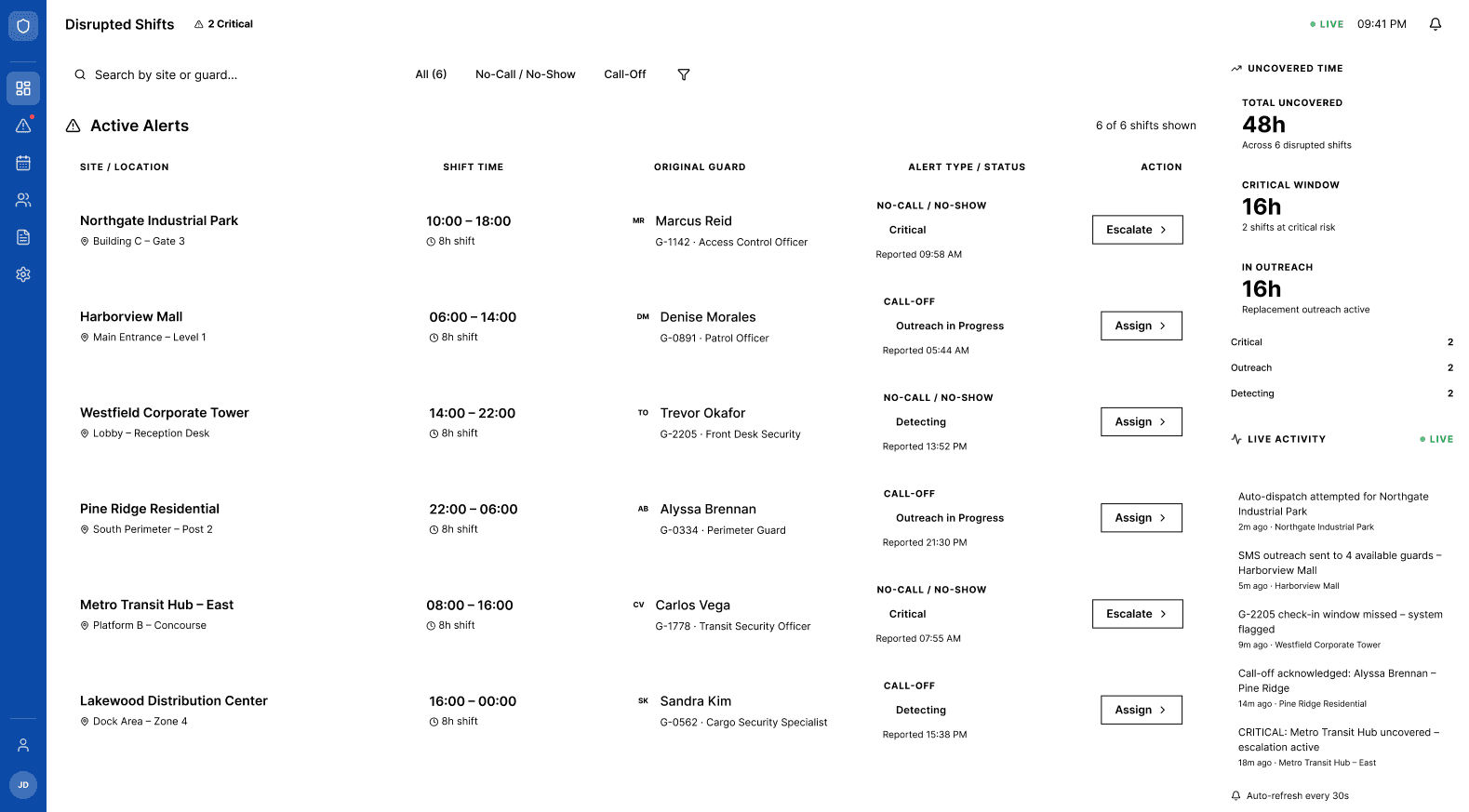
Finally, I have a viable working prototype that shows proof of concept while also keeping my brands coloring, WCAG accessibility standards, and basic design principles top of mind.
Prompt 3:
Can you add a left navigation bar, 50px wide, that includes 6 nagivation links, with background color #0C4AA7? Just generic links like Profile, settings, Schedule, etc. They can just be shown with an icon, no label needed. Another important caveat, we need to follow WCAG 2.2 standards, to maintain accessibility principles. Currently, the shifts are shown in rows, but there's no visual differentiator between the rows, I'm hoping to contain each row with either colour, a border, or something to clearly differentiate one row from the other.
Finally, I have a viable working prototype that shows proof of concept while also keeping my brands coloring, WCAG accessibility standards, and basic design principles top of mind.
Prompt 3:
Can you add a left navigation bar, 50px wide, that includes 6 nagivation links, with background color #0C4AA7? Just generic links like Profile, settings, Schedule, etc. They can just be shown with an icon, no label needed. Another important caveat, we need to follow WCAG 2.2 standards, to maintain accessibility principles. Currently, the shifts are shown in rows, but there's no visual differentiator between the rows, I'm hoping to contain each row with either colour, a border, or something to clearly differentiate one row from the other.
Finally, I have a viable working prototype that shows proof of concept while also keeping my brands coloring, WCAG accessibility standards, and basic design principles top of mind.
Prompt 3:
Can you add a left navigation bar, 50px wide, that includes 6 nagivation links, with background color #0C4AA7? Just generic links like Profile, settings, Schedule, etc. They can just be shown with an icon, no label needed. Another important caveat, we need to follow WCAG 2.2 standards, to maintain accessibility principles. Currently, the shifts are shown in rows, but there’s no visual differentiator between the rows, I’m hoping to contain each row with either colour, a border, or something to clearly differentiate one row from the other.

Great POC, can discuss with users & stakeholders
Great POC, can discuss with users & stakeholders
Finally, I have a viable working prototype that shows proof of concept while also keeping my brands coloring, WCAG accessibility standards, and basic design principles top of mind. This is just a very brief example of how I use AI to ideate, prototype, and brainstorm with me. It's not perfect, but it's an incredible time savings, especially when I've been working on showing new prototypes to customers on a weekly cadence.
Finally, I have a viable working prototype that shows proof of concept while also keeping my brands coloring, WCAG accessibility standards, and basic design principles top of mind. This is just a very brief example of how I use AI to ideate, prototype, and brainstorm with me. It's not perfect, but it's an incredible time savings, especially when I've been working on showing new prototypes to customers on a weekly cadence.
Finally, I have a viable working prototype that shows proof of concept while also keeping my brands coloring, WCAG accessibility standards, and basic design principles top of mind. This is just a very brief example of how I use AI to ideate, prototype, and brainstorm with me. It’s not perfect, but it’s an incredible time savings, especially when I’ve been working on showing new prototypes to customers on a weekly cadence.
Bonus Tips:
Ask AI to check for accessibility
Ask AI to run a full scan of your work, look for inconsistancies in typography, spacing, color, etc. but don't change anything, just document all your findings. I find this is one of my most heavily used prompts and doesn't lead to unwanted changes
Bonus Tips:
Ask AI to check for accessibility
Ask AI to run a full scan of your work, look for inconsistancies in typography, spacing, color, etc. but don't change anything, just document all your findings. I find this is one of my most heavily used prompts and doesn't lead to unwanted changes
Finally, I have a viable working prototype that shows proof of concept while also keeping my brands coloring, WCAG accessibility standards, and basic design principles top of mind. This is just a very brief example of how I use AI to ideate, prototype, and brainstorm with me. It’s not perfect, but it’s an incredible time savings, especially when I’ve been working on showing new prototypes to customers on a weekly cadence.
2-3
2-3
New protoypes per week
New protoypes per week
New protoypes per week
7.2
7.2
Avg. Prompts when using Gems
Avg. Prompts when using Gems
Avg. Prompts when using Gems
15+
15+
Hours saved weekly
Hours saved weekly
Hours saved weekly
Deliver
Goal
Ship polished experiences and support implementation across teams.
Ship polished experiences and support implementation across teams.
Ship polished experiences and support implementation across teams.
How I Use AI
Writing implementation-ready documentation
Generating acceptance criteria and edge-case considerations
Creating presentation narratives for stakeholders
Producing onboarding or handoff materials
Auditing flows for consistency and accessibility considerations
Writing implementation-ready documentation
Generating acceptance criteria and edge-case considerations
Creating presentation narratives for stakeholders
Producing onboarding or handoff materials
Auditing flows for consistency and accessibility considerations
Writing implementation-ready documentation
Generating acceptance criteria and edge-case considerations
Creating presentation narratives for stakeholders
Producing onboarding or handoff materials
Auditing flows for consistency and accessibility considerations
Tools
Claude, Gemini, Jira, Figma
Claude, Gemini, Jira, Figma
Claude, Gemini, Jira, Figma

I have recently started taking my designs, and getting Figma Make, or Claude, to write documentation, which I then copy/paste into our Confluence page to share with the engineers. It doesn't only do documnetation, I can ask for the edge case scenarios, the list of design tokens used, the permission models, a list of items out of scope, and even open ended questions for the engineers.
I have recently started taking my designs, and getting Figma Make, or Claude, to write documentation, which I then copy/paste into our Confluence page to share with the engineers. It doesn't only do documnetation, I can ask for the edge case scenarios, the list of design tokens used, the permission models, a list of items out of scope, and even open ended questions for the engineers.
I have recently started taking my designs, and getting Figma Make, or Claude, to write documentation, which I then copy/paste into our Confluence page to share with the engineers. It doesn't only do documnetation, I can ask for the edge case scenarios, the list of design tokens used, the permission models, a list of items out of scope, and even open ended questions for the engineers.
Lessons Learned
Lessons Learned
Lessons Learned
AI is most useful when it reduces friction around execution and prototyping ideas, not when it replaces critical thinking. There are plenty of people I know who use AI very aggressively, and although they have created some incredible things, I don't think they're the best product designers. The gap I'm seeing is to know:
When to trust it,
When to challenge it
When human intuition matters more
Design is still fundamentally about understanding people, making decisions under ambiguity, and shaping experiences that feel useful, intuitive, and human. AI simply changes the surface area of the work.
AI is most useful when it reduces friction around execution and prototyping ideas, not when it replaces critical thinking. There are plenty of people I know who use AI very aggressively, and although they have created some incredible things, I don't think they're the best product designers. The gap I'm seeing is to know:
When to trust it,
When to challenge it
When human intuition matters more
Design is still fundamentally about understanding people, making decisions under ambiguity, and shaping experiences that feel useful, intuitive, and human. AI simply changes the surface area of the work.
AI is most useful when it reduces friction around execution and prototyping ideas, not when it replaces critical thinking. There are plenty of people I know who use AI very aggressively, and although they have created some incredible things, I don’t think they’re the best product designers. The gap I’m seeing is to know:
When to trust it,
When to challenge it
When human intuition matters more
Design is still fundamentally about understanding people, making decisions under ambiguity, and shaping experiences that feel useful, intuitive, and human. AI simply changes the surface area of the work.
Final Thoughts
Final Thoughts
Final Thoughts
The future product designer is definitely no longer majorly designing screens or workflows.
I would say a part of past and surely the future belongs to solution builders who can connect users, business, technology, AI, and execution together. Tools will continue to change every year. Problem-solving will never go out of demand. What is changing is the expectation from designers. Modern product designers need to think beyond interfaces:
• Business impact
• Systems thinking
• Development workflows
• User psychology
• Stakeholder alignment
• AI-assisted execution
• Operational efficiency
• Product strategy
• Measurable outcomes
Today I help shape the users experience, influence requirements, align cross-functional teams, define UX KPIs, modernize design-to-development workflows, and contribute to broader product direction across platforms. Sure, AI can create visually impressive designs, but it's the work beyond just the designs that make me a strong product designer. Speaking of AI though, here's an image created prompting it for a visual reference of what a strong product designer does today. It says 1000 words.
The future product designer is definitely no longer majorly designing screens or workflows. I would say a part of past and surely the future belongs to solution builders who can connect users, business, technology, AI, and execution together. Tools will continue to change every year. Problem-solving will never go out of demand. What is changing is the expectation from designers. Modern product designers need to think beyond interfaces:
• Business impact
• Systems thinking
• Development workflows
• User psychology
• Stakeholder alignment
• AI-assisted execution
• Operational efficiency
• Product strategy
• Measurable outcomes
Today I help shape the users experience, influence requirements, align cross-functional teams, define UX KPIs, modernize design-to-development workflows, and contribute to broader product direction across platforms. Sure, AI can create visually impressive designs, but it's the work beyond just the designs that make me a strong product designer. Speaking of AI though, here's an image created prompting it for a visual reference of what a strong product designer does today. It says 1000 words.
The future product designer is definitely no longer majorly designing screens or workflows.
I would say a part of past and surely the future belongs to solution builders who can connect users, business, technology, AI, and execution together. Tools will continue to change every year. Problem-solving will never go out of demand. What is changing is the expectation from designers. Modern product designers need to think beyond interfaces:
• Business impact
• Systems thinking
• Development workflows
• User psychology
• Stakeholder alignment
• AI-assisted execution
• Operational efficiency
• Product strategy
• Measurable outcomes
Today I help shape the users experience, influence requirements, align cross-functional teams, define UX KPIs, modernize design-to-development workflows, and contribute to broader product direction across platforms. Sure, AI can create visually impressive designs, but it’s the work beyond just the designs that make me a strong product designer. Speaking of AI though, here’s an image created prompting it for a visual reference of what a strong product designer does today. It says 1000 words.

Felt fitting to use an AI created image of what I do as a product designer. The only thing I see wrong is my dislike for hot beverages, I’m almost always drinking something ice cold… Maybe next year it’ll do better.
Felt fitting to use an AI created image of what I do as a product designer. The only thing I see wrong is my dislike for hot beverages, I’m almost always drinking something ice cold… Maybe next year it’ll do better.
Felt fitting to use an AI created image of what I do as a product designer. The only thing I see wrong is my dislike for hot beverages, I’m almost always drinking something ice cold… Maybe next year it’ll do better.